MEDICAL CHECKS
Athlete medical check tracking. Every expiry date on one screen.
Athlete medical check tracking looks the same in a lot of clubs: a folder of certificates and a spreadsheet someone updates by hand — until, just before a competition, it turns out a player's check ran out two months ago. Clubiqo keeps the exam date, the duration and the document for every player, works out the expiry date itself and shows who is covered, whose check expires soon and who has none at all. Parents can submit results for approval, and the web dashboard's home screen shows what needs sorting out.
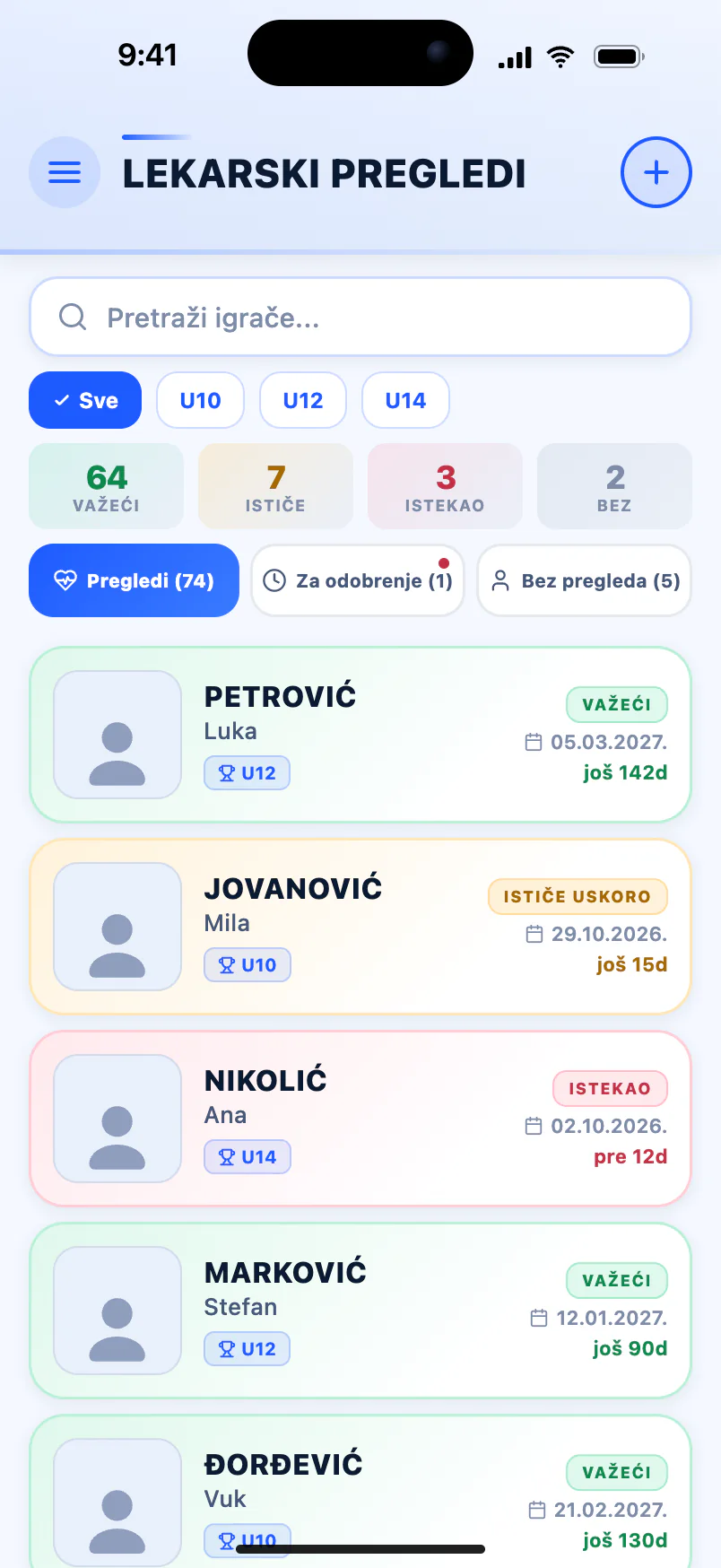
-
Expiry worked out for you
Enter the exam date and the duration in months, and the app calculates how long the check is valid. You can still edit the date by hand.
-
A status for every athlete
Valid, expiring soon, expired or no check — with counters at the top of the screen and a filter by category.
-
Parents send the result
They photograph the certificate in the parent app and submit it for approval. It only counts once the club approves it.
-
On the dashboard home screen
The web dashboard lists expired checks and those about to expire, and Google Sheets copies them into your own spreadsheet.
Medical check tracking that works out the dates
A medical check is valid for a limited time, and a club with a hundred athletes has a hundred different expiry dates. So Clubiqo doesn't ask for a single date: you enter the exam date and the duration, and the expiry date is calculated automatically as the exam date plus the chosen number of months. If the certificate states a different date, you simply change it. You can attach the document too — a photo of the certificate in the mobile app, or an image or PDF of up to 10 MB on the web dashboard. For new members joining through online registration, add the check as soon as they bring the certificate in.
- Exam date and a duration of 1 to 6 months, 6 by default
- Expiry date calculated automatically, editable by hand
- A photo from the phone or a PDF of up to 10 MB from a computer
- "Expiring soon" status when 30 days or fewer are left
- "Expired" status the moment the date passes
- Search by name and filter by category
Who is ready to compete, and whose check is running out
Before every match or competition the question is the same: which of the selected athletes have a valid check. In the mobile app, the medical checks screen has three tabs — "Checkups", "No checkup" and "For approval" — with counters for valid, expiring, expired and missing checks at the top, so you can read the state of a whole group in seconds. On the web dashboard's home screen, a medical checks widget shows how many checks have expired and how many are about to, with names and the number of days. The "Expiring soon" status appears 30 days before expiry, early enough to book the next check in time.
- Statuses: valid, expiring soon, expired and no check
- Tabs for checks, athletes without one and those awaiting approval
- Valid / expiring / expired / none counters at the top
- A category filter for the check before a competition
- A dashboard widget with names and days to expiry
- A clear all-valid message when there is nothing to chase
Parents submit, the club approves
When the club switches on parent medical checkups, a parent can add a check from their own app: the exam date, the duration, the expiry date and a photo of the certificate, then submit it for approval. Admins and coaches with permission are notified that a check is waiting. While reviewing it they can correct the expiry date, then approve it or reject it with a reason. Until it is approved the check doesn't count as valid, so nothing reaches the record unchecked. The parent is then told the check was approved and when it expires — or that it was rejected, with the reason and an invitation to send a new one.
- Switched on per club, in the club settings
- Parents send the exam date, duration and a photo of the certificate
- A notification to admins and coaches with permission
- The expiry date can be corrected before approval
- Rejection with a reason, and the parent can resubmit straight away
- A pending check doesn't count as valid
Coaches, parents and a spreadsheet in Google Drive
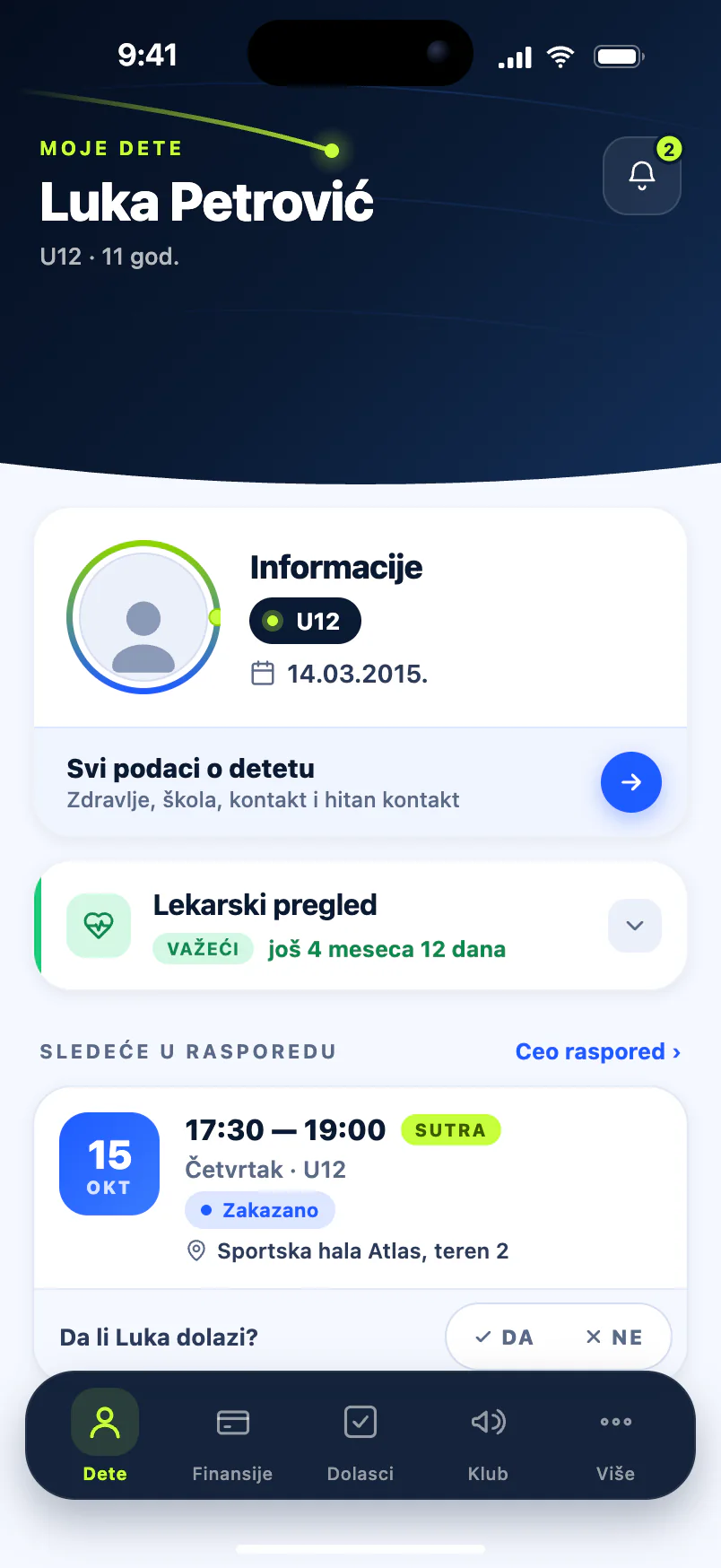
Medical checks don't have to sit with the board alone. A coach you give the medical checks permission can add and approve checks in the mobile app, while adding, deleting and approving on the web dashboard stay with the admin. In the parent app, the parent sees the status and expiry date on their child's screen and can download the approved certificate. When the club records a check itself, the parent is notified of the date it is valid until. If the club connects its Google account, a medical checks sheet is written into a spreadsheet in your Google Drive daily, weekly or on demand.
- A medical checks permission for coaches, at the club's discretion
- A status card on the child's screen in the parent app
- "Download document" for the current approved check
- A notification to the parent when the club records or approves a check
- Google Sheets: category, valid until, days left and status
- A valid-until column in the players sheet too
Common questions
How long is an athlete's medical check valid?
That depends on the rules of your sport's governing body and, where they apply, national regulations, so check with your federation or a sports medicine doctor — we cover it in more detail in our athlete medical check guide. In Clubiqo you choose the duration when you enter a check, from one to six months, with six as the default. The expiry date is calculated for you, and you can change it by hand if the certificate says otherwise.
Does the app send a reminder when a medical check is about to expire?
It doesn't send an automatic notification. A check with 30 days or fewer left gets the "Expiring soon" status and a different colour, and the web dashboard's home screen lists expired checks and those about to expire, with the number of days. In practice, a glance at that list once a week is enough to contact the parents whose checks are running out in good time.
Can parents upload their child's medical check themselves?
Yes, if the club switches on parent medical checkups. The parent enters the exam date, the duration and a photo of the certificate in their app and submits it for approval. Admins and coaches with permission are notified, review the certificate and approve it or reject it with a reason. Until it is approved the check doesn't count as valid, and the parent is notified of every decision.
Can coaches record and approve medical checks?
Yes, if an admin gives them the medical checks permission. In the mobile app such a coach can add new checks and approve the ones parents have sent, and their access can be limited to the categories they coach. On the web dashboard, adding, deleting and approving checks stay with the admin. The coach has current information at training, and the board keeps control.
Can I get our medical check records into a spreadsheet?
Yes, through the Google Sheets sync. Once the club connects its Google account, Clubiqo writes a medical checks sheet daily, weekly or on demand, with first name, surname, category, valid-until date, days to expiry and status, and adds a valid-until column to the players sheet. The sync runs one way: the spreadsheet is refreshed from the app, so changes should be made in Clubiqo.
See also
- Parent app Parents see their child's attendance, fees and arrears, purchases, competition costs, progress and club announcements in their own app. Read more
- Online registration Online club registration: send a parent a link or QR code, they fill in the form, and the player and parent account are created at once. Free for 14 days. Read more
- Football club Run a football club from one app: age groups from U9 to the first team, attendance, membership fees, medical checks and match stats. Free for 14 days. Read more
- Swimming club A swimming club app for squads by ability, early-morning attendance, membership fees, medical checks and galas with placings. Free for 14 days. Read more
From the blog
- Athlete Medical Checks: What Clubs Need to Know Who needs a medical before training, how often, and who keeps the paperwork? It depends on the country — here is how three systems differ, and a routine that works anywhere. Read more
- How to Digitize a Sports Club in 2026 Spreadsheets, notebooks and WhatsApp groups work while a club is small. Here's how to go digital within a month — without chaos or two sets of records. Read more
Know who has a valid check before every competition
Free for 14 days, no credit card. Importing your roster and onboarding are free too.
Start for free