KIT SALES
Club kit sales. Down to the last instalment.
Club kit sales usually start with a message in the group chat — "anyone who wants the new tracksuit, send me your size" — and end in a notebook where nobody can tell who paid half, who paid in full and who never replied. Clubiqo tracks each product separately: who it is charged to, at what price, how much has come in and what is left before the deadline. Parents see what they owe in their own app, accept or decline offers and add their size, and you remind the ones running late in a single tap.
-
Each product on its own
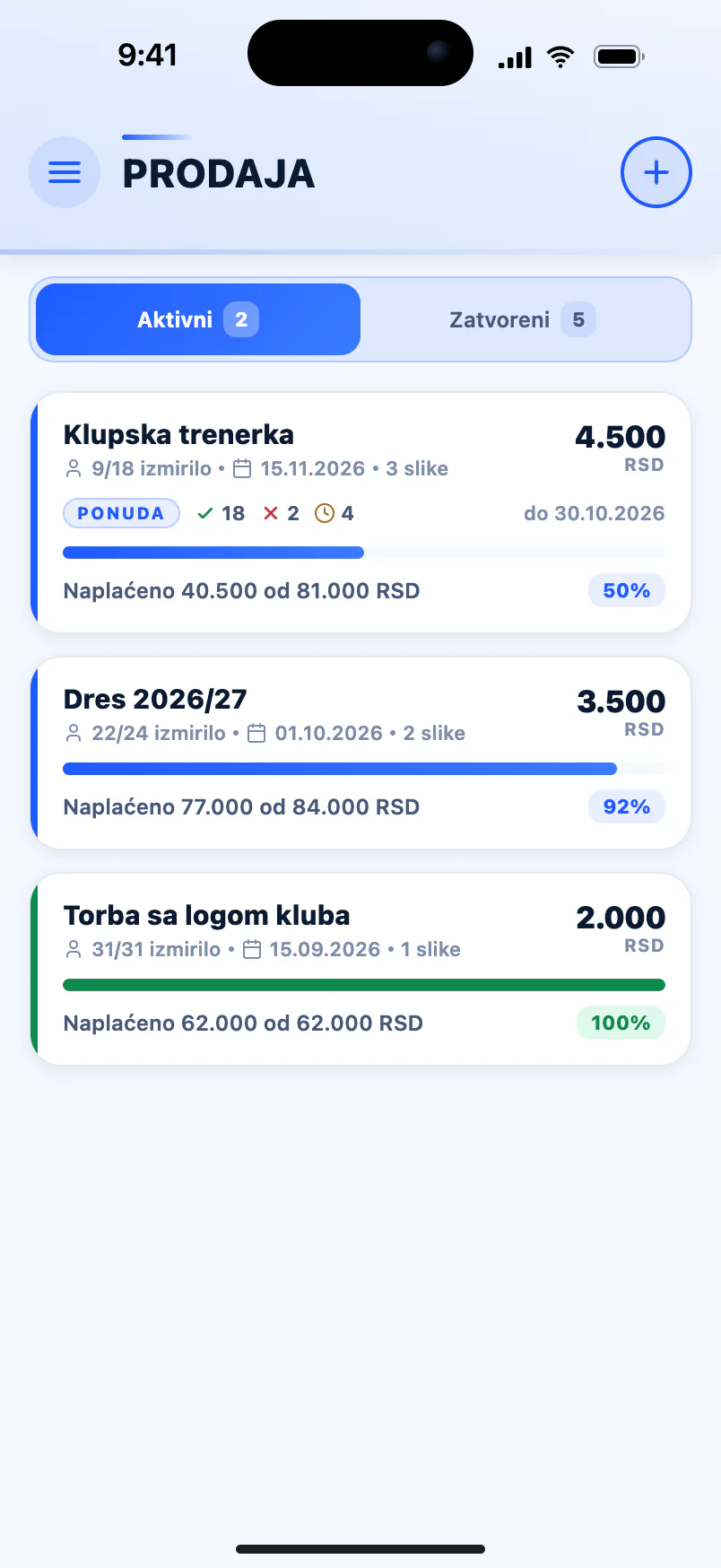
Name, price per player, a pay-by date, a description and up to three photos — plus the players it applies to.
-
Payment in instalments
Each payment is recorded separately, in cash or by bank transfer, and the balance works itself out.
-
An offer, not a poll
Parents accept or decline and add their size. The debt only exists once they accept.
-
Reminders for late payers
A notification goes only to parents who haven't settled — one tap, no lists.
Kit charged per player, not in a notebook
Every product has its own record: a name, the price per player, the currency, an optional pay-by date and a description, plus up to three photos from the mobile app. Then you choose who it applies to — by searching, with "Select all" or, on the phone, a whole category at once. Every player is charged the full price, and "Change amount" lowers it for an individual: a sibling discount, say, or a child the club is helping out. If you turn on "Notify parents", each parent is told straight away about the product, the amount and the pay-by date.
- Jerseys, tracksuits, bags, bundles — anything the club charges for
- Price per player, currency and an optional pay-by date
- Up to three product photos from the mobile app
- Choose players by search, "Select all" or by category
- "Change amount" for an individual discount
- A push to parents as soon as the product is added
Instalments and a clear balance
A full kit is rarely paid for in one go. So for sales, each payment is entered separately through "Record payment": the amount, the method — cash or bank — and an optional note. The app won't accept more than the remaining balance, so a typo can't create an overpayment. The product's detail screen shows how much has been collected, how many players have settled, how many still owe and what is outstanding in total. Once the deadline passes, it also shows how many players haven't paid. After every payment the parent is told the amount paid and what remains, and once everything is paid, that the purchase is settled in full.
- Part payments, each with a method and a note
- An entry can't exceed the remaining balance
- Collected, settled, owing and remaining at a glance
- Filters for players who have settled and those who owe
- After the deadline: how many haven't paid and when it was due
- A payment-recorded notification with the balance left
Offers to parents: sizes first, then the charge
For kit not everyone buys — a winter jacket, a camp T-shirt or a show costume at a dance school — there is no point charging the whole list and then deleting the people who don't want it. "Offer to parents" works the other way round: parents choose whether to accept, and the debt only exists once they do. Set a reply deadline and a note for parents of up to 500 characters, such as a size chart. Parents reply with Accept or Decline and add a note of their own, for example "I'm ordering size L". You follow how many have accepted, declined or are still waiting, so you know exactly how many to order.
- No debt until the parent accepts the offer
- A required reply deadline, which can be extended
- A note for parents of up to 500 characters
- The parent's own note — size, number, name on the shirt
- An accepted · declined · waiting summary
- A reminder to parents who haven't replied
What parents see under Finances → Purchases
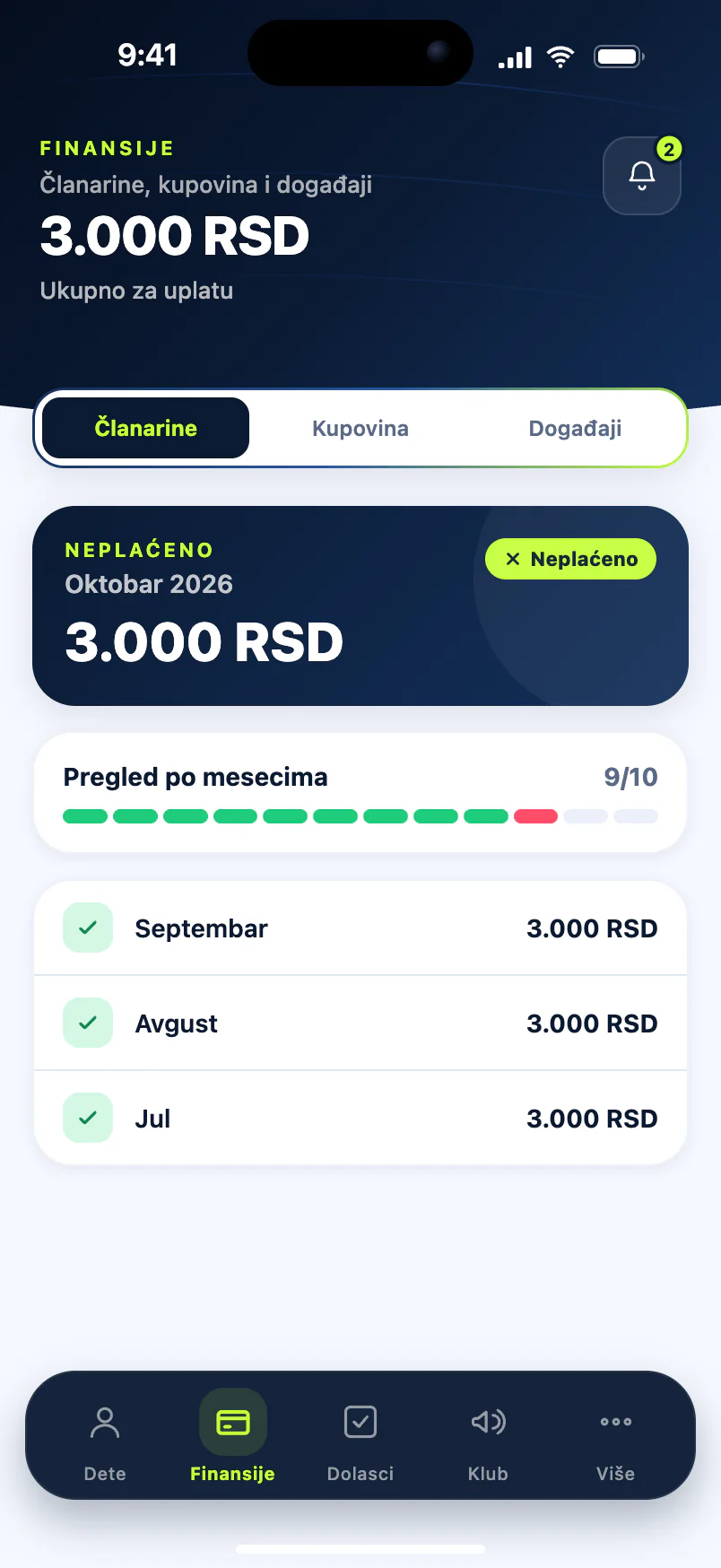
Parents don't need to ask how much is left to pay on the tracksuit. In the parent app, under Finances → Purchases, each product shows paid, total and remaining, the pay-by date, the list of payments, photos and a status: settled, in progress or overdue. Club offers sit in the same place, as a club offer card. When you need to nudge those who haven't paid, "Send reminder" pushes only to them, and the next one is available after six hours, so parents aren't flooded. A parent with two children at the club gets one notification, not two.
- Paid, total and remaining for every product
- Status: settled, in progress or overdue
- A club offer card with Accept and Decline
- "Send reminder" goes only to those who haven't settled
- A six-hour pause between two reminders
- Sales run by admins and coaches with sales permission
Common questions
How do I collect for kit when parents pay in instalments?
Charge the product to the players, then enter each instalment through "Record payment", in cash or by bank transfer. The app adds up the payments, shows the remaining balance and won't accept more than what is left. After every instalment the parent is notified of the amount paid and the balance. Unlike membership fees, which are recorded as paid in full, sales are built for instalments from the start.
What if a parent changes their mind?
With an offer, the parent can simply decline, so no debt is created, and anyone who doesn't reply by the deadline owes nothing. If they have already accepted, they can withdraw in the app until the club records a payment; after that, withdrawing is agreed directly with the club. For kit you order in, it helps to set the reply deadline before you send the order to your supplier.
Can parents pay for kit through the app?
Not directly. Clubiqo keeps the record, and the money goes to the club as before — in cash or by transfer to the club's account. When a payment arrives you record it with the method used, and the parent is notified straight away with the balance left. That also means no per-transaction commission and no payment provider for the club to sign up with.
Does every player have to pay the same price?
No. Every selected player is charged the full price, and "Change amount" lowers it for an individual — a sibling discount, or a child the club is helping out. Payments already recorded stay as they are. Each parent sees the amount that applies to their own child, and the collection summary on the product works from the actual amounts.
How do I know how many items and which sizes to order?
Send an offer instead of a charge. Put the size chart in the note for parents and switch on "Parent reply is required" — parents then can't accept without writing a reply, so everyone who accepts gives a size. The accepted · declined · waiting summary shows how many items are confirmed, and you can send a reminder to anyone who hasn't replied before the deadline closes.
See also
- Membership fees Track and collect club membership fees: automatic monthly charges, payment history, receipts, parent reminders and SMS for adult members. Read more
- Parent app Parents see their child's attendance, fees and arrears, purchases, competition costs, progress and club announcements in their own app. Read more
- Dance school An app for dance clubs and schools: groups by level, attendance records, membership fees, costumes and performances. Free for 14 days. Read more
- Football club Run a football club from one app: age groups from U9 to the first team, attendance, membership fees, medical checks and match stats. Free for 14 days. Read more
From the blog
- Membership Fee Management for Sports Clubs: The Complete Guide Unpaid fees are every club's biggest silent loss. Here's how to set clear rules, run a monthly routine and keep records that show who owes — without awkward conversations. Read more
- Why Parents Need Visibility Into the Club and Their Child's Progress A parent who can see attendance, fees and progress is calmer, more involved and more loyal to the club. Here's what to show them, where to draw the line and how to set it up. Read more
Collect for kit without a notebook or a group chat
Free for 14 days, no credit card. Kit sales are included in every plan.
Start for free